
# HA Architecture
This document explains Highly Available (HA) architectural deployment guidance for yCrash Enterprise Edition
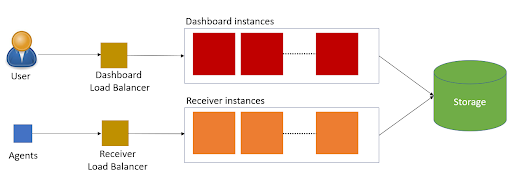
# JVM Instances & Load Balancer
Dashboard Load Balancer: This Load Balancer will route the traffic to Dashboard JVM instances. We need to make sure following are enabled in this Load Balancer:
Sticky session load balancing
Persistent HTTP connection
The URL of the Dashboard Load Balancer should be published to users in your organization.
Dashboard Instances: Separate set of JVMs should be deployed to handle the users UI traffic. Dashboard Load Balancer will route the traffic to JVM instances in this pool. When customers use their browsers to see the incident report this is the set of JVM instances where their traffic will be handled.
Receiver Load Balancer: This Load Balancer will route the traffic to Receiver JVM instances. We need to make sure following are enabled in this Load Balancer:
- Persistent HTTP connection
The URL of the Receiver Load Balancer should be published to users in the 's' (i.e., server endpoint) argument of the yc-360 script configuration.
Receiver Instances: Separate set of JVMs should be deployed to handle the yc-360 script's which are running on your production servers.
# Database
To improve the performance of the calendar dashboard page and m3 sampling, incidents can be stored in the Database. Currently we are supporting the following two databases:
Postgres Database: Follow the instructions on setting up the Postgres Database, please refer to the following document: Postgres Database Server Setup
H2 Database: Follow the instructions on setting up the H2 Database, please refer to the following document: H2 Database Server Setup
Note: We highly recommend you to use postgres database for high availability & scalability
# Storage
When it comes to storage, there are 3 options:
Remote/Cloud Storage
Distributed File System
Local Disk (not preferred, but OK to begin with)
For more details, please refer to documentation provided here.
# Memory
You might have multiple applications in the production environment. Each application will have different heap size (i.e. -Xmx) settings. You need to get the maximum heap size setting and multiply it by 2. Resulting value should be your yCrash JVM instances (both 'Dashboard' and 'Receiver') heap size. Say your largest heap size value is 6GB, the yCrash JVMs should have 12GB as it's heap size.