
# ServiceNow Integration
When a new incident is reported in yCrash, you might want to create a support ticket in ServiceNow automatically. To facilitate this, we have developed a plugin to integrate with ServiceNow.
Just by following two simple steps given below, you can create tickets in ServiceNow automatically.
# 1. Create a ServiceNow configuration file
Create an XML configuration file by name 'snow.xml'. This file will contain ServiceNow endpoint, authentication, and other field details.
snow.xml should contain below properties:
| XML property Keys | XML property Value |
|---|---|
| end_point | ServiceNow API endpoint URL |
| basic_authorization | Authorization credentials for ServiceNow API |
| field.* | For example, if there is a field "Caller" in your ticket, then you need to give this field's key as "field.caller_id". In the value of this entry specify the caller Id's name. Example: <entry key="field.caller_id"> System Administrator </entry> |
Say suppose below are the fields in your ServiceNow ticket:
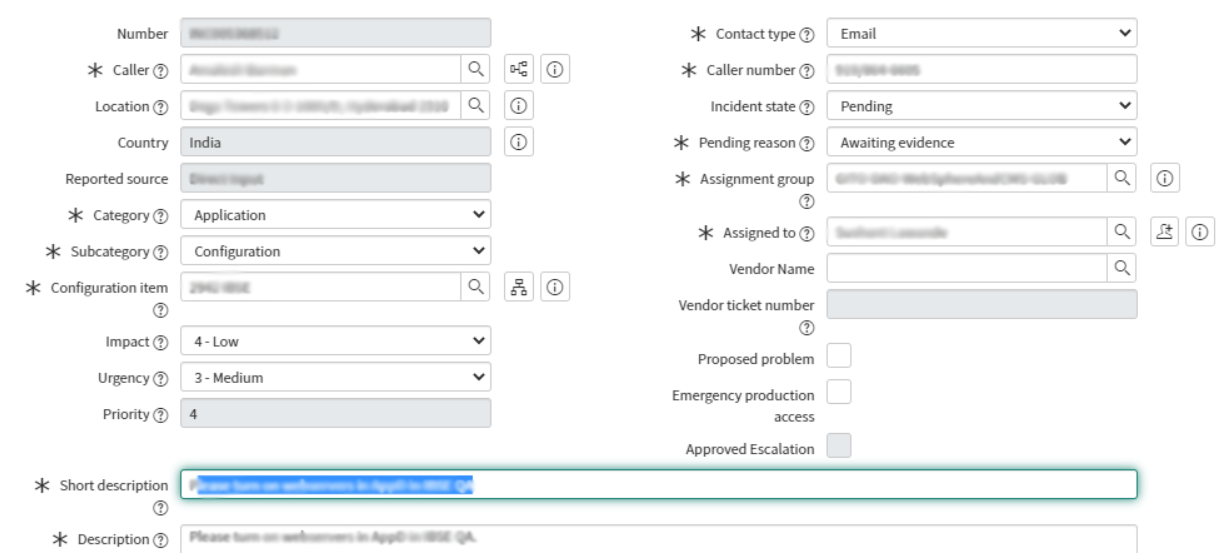
Then below is the corresponding snow.xml configuration file:
<?xml version="1.0" encoding="UTF-8"?>
<!DOCTYPE properties SYSTEM "http://java.sun.com/dtd/properties.dtd">
<properties>
	<comment>Service Now properties</comment>
	<entry key="end_point">https://dev95505.service-now.com/api/now/v1/table/incident</entry>
	<entry key="basic_authorization">Basic hvchdhsghdgsuTTFSDHGHGUU=</entry>
	<entry key="field.caller_id">System Administrator</entry>
	<entry key="field.category">Application</entry>
	<entry key="field.sub_category">configuration</entry>
	<entry key="field.configuration_item">$APP_NAME</entry>
	<entry key="field.contact_type">Email</entry>
	<entry key="field.caller_number">1234567890</entry>
	<entry key="field.pending_reason">Awaiting</entry>
	<entry key="field.short_description">$YCRASH_SHORT_DESCRIPTION</entry>
	<entry key="field.description">$YCRASH_DESCRIPTION</entry>
</properties>
2
3
4
5
6
7
8
9
10
11
12
13
14
15
16
Certain fields in the ServiceNow ticket should contain values specific to the reported incident. Say there might be a field in the ServiceNow ticket where you want to store the application name. However, the application name will vary based on the incident. Thus, to generate dynamic value based on the incident, following tokens are made available to you.
| Token | Value |
|---|---|
| $APP_NAME | Name of the application |
| $YCRASH_SHORT_DESCRIPTION | APP_NAME running on HOST_NAME had a problem |
| $YCRASH_DESCRIPTION | APP_NAME running on HOST_NAME had a problem. yCrash root cause analysis report can be found here: https://ycrashserver:port/yc-report.jsp?... |
You configure these tokens in the appropriate fields in the snow.xml.
Say for example if you want the 'configuration_item' field in the ServiceNow ticket to contain the name of the application, then you can add this entry to snow.xml:
<entry key="field.configuration_item">$APP_NAME</entry>
# 2. Place ServiceNow configuration file
PPlace the newly created snow.xml in the 'upload' directory.