
# yCrash MCP Integration Guide
yCrash now supports Model Context Protocol (MCP), an open standard that lets AI applications such as Cursor, Claude Desktop, and custom enterprise agents discover and invoke yCrash analysis capabilities as tools.
This guide explains what MCP adds to your yCrash deployment, how to install and configure the MCP server, how to authenticate, how to pass diagnostic files (filePath), how custom applications call tools over stdio or HTTP, what responses to expect, and how to operate the integration in production.
# 1. Overview
# What is MCP?
Model Context Protocol (MCP) is an open standard that lets AI applications (IDEs, chat products, and custom agents) discover and invoke external capabilities as tools. Configure an MCP server once. Compatible hosts can then list and call those tools at runtime, without writing a custom integration for each AI product.
# What yCrash MCP provides
The yCrash MCP server exposes four tools that map directly to your existing yCrash REST APIs:
| MCP tool | yCrash REST API | Purpose |
|---|---|---|
analyzeGcLog | POST /analyzeGC | Analyze Java GC logs |
analyzeThreadDump | POST /fastthread-api | Analyze JVM thread dumps |
analyzeHeapDump | POST /analyze-hd-api | Analyze JVM heap dumps |
generateLdapToken | POST /ldap/token | Obtain an LDAP JWT for bearer authentication |
# Deliverable
ycrash-mcp-server.jar is a standalone Java application that bridges MCP clients to your yCrash REST APIs. It does not replace REST, Swagger, or the yCrash UI. It complements them for AI-native workflows.
# Two minutes to understand the product
| Question | Answer |
|---|---|
| What do I install? | One JAR: ycrash-mcp-server.jar (plus JDK 17) |
| What talks to yCrash? | The MCP server, not the IDE chat UI directly |
| How do developers use it day to day? | Configure Cursor/Claude (stdio or HTTP) and ask in natural language |
| How do teams share one endpoint? | Run the same JAR in HTTP mode behind HTTPS |
| How do I send a file? | Place the dump on the MCP server host and pass filePath (or paste text / give a public URL) |
| How do custom apps call tools? | Same JSON-RPC tools/call over stdio (spawn JAR) or HTTP (POST /mcp). See §6. |
# 2. Prerequisites
# yCrash environment
| Requirement | Details |
|---|---|
| yCrash instance | A running yCrash deployment reachable from the MCP server host |
| Base URL | Example: https://ycrash.your-company.com (no trailing slash) |
| Credentials | API key or LDAP username/password (bearer mode). Same credentials as yCrash REST access. |
| Network | MCP host must reach /analyzeGC, /fastthread-api, /analyze-hd-api, and /ldap/token |
# MCP server host
| Requirement | Details |
|---|---|
| Java | JDK 17 or later |
| Memory | At least 256 MB heap for the MCP process; increase for large heap dumps |
| Disk | For filePath input, diagnostic files must exist on the machine running the MCP server |
# MCP client (AI host)
Any MCP-compatible client, for example:
- Cursor
- Claude Desktop
- A custom application using an MCP client library (Python, TypeScript, Java/LangChain4j, etc.)
# 3. Architecture
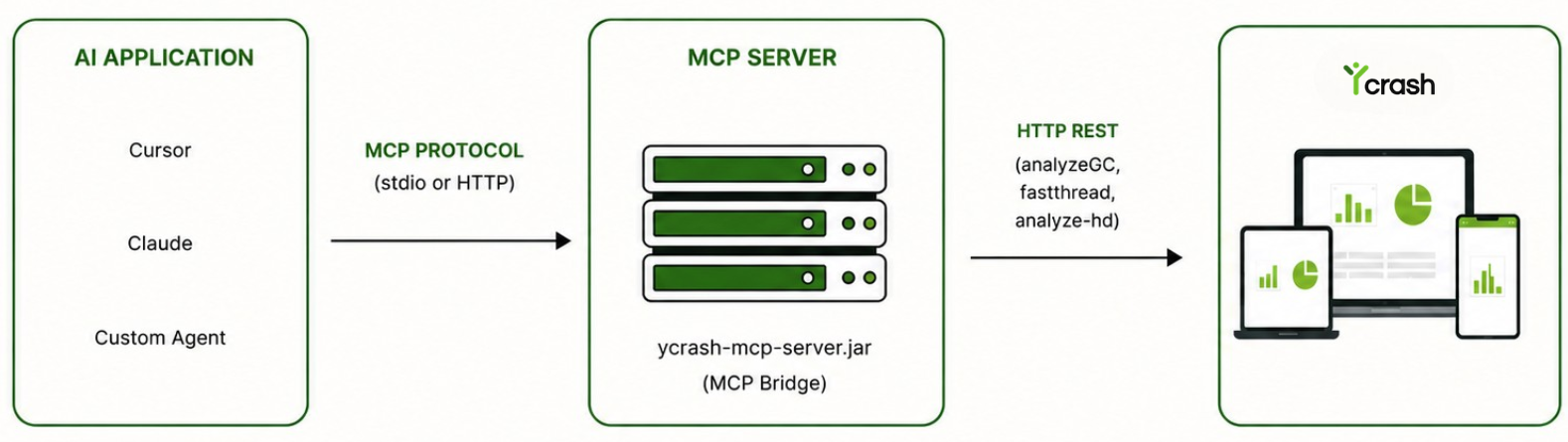
# Key points
- The MCP server is a separate process from yCrash. It is not embedded in the yCrash WAR.
- The MCP client talks only to the MCP server. The MCP server calls yCrash REST on your behalf.
- yCrash REST credentials (
YCRASH_API_KEYor LDAP/bearer) live on the MCP server process. Separately, HTTP MCP requiresYCRASH_MCP_HTTP_API_KEYso clients authenticate to the/mcpendpoint itself.
# Transport options
| Transport | Best for | How it works |
|---|---|---|
| stdio | Desktop IDEs, per-developer setups | The AI host spawns java -jar ycrash-mcp-server.jar and talks over stdin/stdout |
| HTTP (Streamable HTTP) | Shared team / enterprise gateways | You run a long-lived HTTP process; clients connect to a URL (default /mcp) |
# 4. Installation
# Obtain the MCP server
The MCP server ships with the yCrash enterprise distribution. After unpacking, locate:
tools/mcp/ycrash-mcp-server.jar
(On Windows: tools\mcp\ycrash-mcp-server.jar.)
Copy the JAR to the host that will run MCP (workstation for stdio, or a shared server for HTTP). No other MCP binaries are required.
Example layout:
/opt/ycrash-mcp/
  ycrash-mcp-server.jar
2
# Verify Java
java -version
Expected: 17.x or higher.
# Verify connectivity to yCrash
From the MCP server host:
curl -s -o /dev/null -w "%{http_code}" "https://ycrash.your-company.com"
# 5. Configuration
This section covers how to configure the MCP server and clients. For invoking tools after configuration, see §6.
# 5.1 Environment variables
Configure three things: where yCrash lives, how the MCP server authenticates to yCrash, and which local folders it may read for filePath.
# Always required
| Variable | Description |
|---|---|
YCRASH_BASE_URL | yCrash base URL without trailing slash, e.g. https://ycrash.your-company.com (opens new window) |
# yCrash authentication (choose one mode)
Do not set both modes.
Mode A: API key
| Variable | Description |
|---|---|
YCRASH_API_KEY | Static yCrash API key |
Leave YCRASH_BEARER_TOKEN and YCRASH_OU unset.
Mode B: Bearer / LDAP
| Variable | When needed | Description |
|---|---|---|
| YCRASH_OU | Required | Organization unit for LDAP / bearer auth |
| YCRASH_BEARER_TOKEN | Optional at startup | Existing JWT, if you already have one |
Leave YCRASH_API_KEY unset. If you omit YCRASH_BEARER_TOKEN, obtain a JWT later via generateLdapToken in the same MCP session.
# How to set the variables (shell)
Use these in the same shell before you start the MCP server, or paste the same names/values into the MCP host env block (see §5.2).
Mode A: API key — Linux / macOS
export YCRASH_BASE_URL=https://ycrash.your-company.com
export YCRASH_API_KEY=your-api-key-here
# Optional:
# export YCRASH_MAX_FILE_BYTES=104857600
2
3
4
Mode A: API key — Windows (PowerShell)
$env:YCRASH_BASE_URL = "https://ycrash.your-company.com"
$env:YCRASH_API_KEY = "your-api-key-here"
# Optional:
# $env:YCRASH_MAX_FILE_BYTES = "104857600"
2
3
4
Mode A: API key — Windows (cmd)
set YCRASH_BASE_URL=https://ycrash.your-company.com
set YCRASH_API_KEY=your-api-key-here
REM Optional:
REM set YCRASH_MAX_FILE_BYTES=104857600
2
3
4
Mode B: Bearer / LDAP — Linux / macOS
export YCRASH_BASE_URL=https://ycrash.your-company.com
export YCRASH_OU=your-org-unit
# Optional at startup (skip if you will call generateLdapToken later):
# export YCRASH_BEARER_TOKEN=eyJhbGciOiJIUzI1NiIs...
# Optional:
# export YCRASH_MAX_FILE_BYTES=104857600
2
3
4
5
6
Mode B: Bearer / LDAP — Windows (PowerShell)
$env:YCRASH_BASE_URL = "https://ycrash.your-company.com"
$env:YCRASH_OU = "your-org-unit"
# Optional at startup (skip if you will call generateLdapToken later):
# $env:YCRASH_BEARER_TOKEN = "eyJhbGciOiJIUzI1NiIs..."
# Optional:
# $env:YCRASH_MAX_FILE_BYTES = "104857600"
2
3
4
5
6
Mode B: Bearer / LDAP — Windows (cmd)
set YCRASH_BASE_URL=https://ycrash.your-company.com
set YCRASH_OU=your-org-unit
REM Optional at startup (skip if you will call generateLdapToken later):
REM set YCRASH_BEARER_TOKEN=eyJhbGciOiJIUzI1NiIs...
REM Optional:
REM set YCRASH_MAX_FILE_BYTES=104857600
2
3
4
5
6
# Local file access for filePath
The server reads disk only when a tool call uses filePath. Set **YCRASH_FILEPATH_ALLOWLIST** before the server will start (stdio and HTTP):
| Value | Use when | Description |
|---|---|---|
| Comma-separated absolute directories | Production (recommended) | Roots the server may read, e.g. /var/ycrash/uploads,D:/dumps |
* (alone) | Trusted demos only | Allow any absolute filePath on the MCP host |
Do not mix * with directory entries. Relative paths are rejected.
Linux / macOS
export YCRASH_FILEPATH_ALLOWLIST=/var/ycrash/uploads,/tmp   # restricted
export YCRASH_FILEPATH_ALLOWLIST='*'                        # unrestricted (demos; quote * in bash)
2
Windows (PowerShell)
$env:YCRASH_FILEPATH_ALLOWLIST = "C:\dumps,D:\temp"   # restricted
$env:YCRASH_FILEPATH_ALLOWLIST = "*"                  # unrestricted (demos only)
2
Windows (cmd)
set YCRASH_FILEPATH_ALLOWLIST=C:\dumps,D:\temp
REM Unrestricted demos only:
set YCRASH_FILEPATH_ALLOWLIST=*
2
3
# Optional
| Variable | Description |
|---|---|
YCRASH_MAX_FILE_BYTES | Maximum upload size in bytes (default: 104857600 = 100 MB) |
# 5.2 Stdio configuration
Configure your MCP host with JSON. Examples use Cursor; Claude Desktop and other hosts use a similar structure.
API key mode
{
  "mcpServers": {
    "ycrash": {
      "command": "java",
      "args": ["-Xmx128m", "-Xms32m", "-jar", "/opt/ycrash-mcp/ycrash-mcp-server.jar"],
      "env": {
        "YCRASH_BASE_URL": "https://ycrash.your-company.com",
        "YCRASH_API_KEY": "your-api-key-here",
        "YCRASH_FILEPATH_ALLOWLIST": "/var/ycrash/uploads,/tmp"
      }
    }
  }
}
2
3
4
5
6
7
8
9
10
11
12
13
Windows paths (prefer forward slashes in JSON):
{
  "mcpServers": {
    "ycrash": {
      "command": "java",
      "args": ["-Xmx128m", "-Xms32m", "-jar", "C:/tools/ycrash-mcp/ycrash-mcp-server.jar"],
      "env": {
        "YCRASH_BASE_URL": "https://ycrash.your-company.com",
        "YCRASH_API_KEY": "your-api-key-here",
        "YCRASH_FILEPATH_ALLOWLIST": "C:/dumps,D:/temp"
      }
    }
  }
}
2
3
4
5
6
7
8
9
10
11
12
13
Bearer / LDAP mode (token already known)
{
  "mcpServers": {
    "ycrash": {
      "command": "java",
      "args": ["-Xmx128m", "-Xms32m", "-jar", "/opt/ycrash-mcp/ycrash-mcp-server.jar"],
      "env": {
        "YCRASH_BASE_URL": "https://ycrash.your-company.com",
        "YCRASH_BEARER_TOKEN": "eyJhbGciOiJIUzI1NiIs...",
        "YCRASH_OU": "your-org-unit",
        "YCRASH_FILEPATH_ALLOWLIST": "/var/ycrash/uploads"
      }
    }
  }
}
2
3
4
5
6
7
8
9
10
11
12
13
14
Bearer / LDAP mode (token via MCP tool generateLdapToken): set YCRASH_BASE_URL and YCRASH_OU only (no API key). After connect, call generateLdapToken in the same session, then run analysis.
After saving, refresh the MCP connection in your host. Success = connected status and four tools listed.
# 5.3 HTTP configuration
# Start the MCP HTTP server
On the shared host, set yCrash credentials, path allow-list, and an MCP HTTP API key (a secret you generate; it does not come from yCrash):
# Linux / macOS: Generate MCP HTTP API key
openssl rand -hex 32
# Set the generated key
export YCRASH_MCP_HTTP_API_KEY="<paste-generated-key>"
2
3
4
# Windows PowerShell: Generate MCP HTTP API key
-join ((1..32) | ForEach-Object { '{0:x2}' -f (Get-Random -Maximum 256) })
# Set the generated key
$env:YCRASH_MCP_HTTP_API_KEY="<paste-generated-key>"
2
3
4
Linux / macOS:
export YCRASH_BASE_URL=https://ycrash.your-company.com
export YCRASH_API_KEY=your-api-key-here
export YCRASH_FILEPATH_ALLOWLIST=/var/ycrash/uploads,/tmp
export YCRASH_MCP_HTTP_API_KEY="<paste-generated-key>"
export YCRASH_MCP_HTTP_HOST=127.0.0.1
export YCRASH_MCP_HTTP_PORT=8080
export YCRASH_MCP_HTTP_PATH=/mcp

java -cp /opt/ycrash-mcp/ycrash-mcp-server.jar \
  com.tier1app.ycrash.mcp.YCrashMcpHttpServerMain
2
3
4
5
6
7
8
9
10
Windows (PowerShell):
$env:YCRASH_BASE_URL = "https://ycrash.your-company.com"
$env:YCRASH_API_KEY   = "your-api-key-here"
$env:YCRASH_FILEPATH_ALLOWLIST = "C:/dumps"
$env:YCRASH_MCP_HTTP_API_KEY = "<paste-generated-key>"
$env:YCRASH_MCP_HTTP_HOST = "127.0.0.1"
$env:YCRASH_MCP_HTTP_PORT = "8080"

java -cp C:\tools\ycrash-mcp\ycrash-mcp-server.jar `
  com.tier1app.ycrash.mcp.YCrashMcpHttpServerMain
2
3
4
5
6
7
8
9
Logged endpoints (example):
MCP HTTP endpoint: http://127.0.0.1:8080/mcp
Health: http://127.0.0.1:8080/health
Ready:  http://127.0.0.1:8080/ready
2
3
Prefer binding to 127.0.0.1 and terminating HTTPS on a reverse proxy for production.
Auth policy:
YCRASH_MCP_HTTP_API_KEYis required (including on localhost), unlessYCRASH_MCP_HTTP_ALLOW_INSECURE=trueon loopback demos only. Non-loopback binds never allow insecure mode.
# Configure MCP clients (URL + MCP API key)
Clients need the MCP URL and the same YCRASH_MCP_HTTP_API_KEY. yCrash REST credentials stay on the server.
Option A: Authorization: Bearer
{
  "mcpServers": {
    "ycrash": {
      "type": "streamable-http",
      "url": "https://mcp.your-company.com/mcp",
      "headers": {
        "Authorization": "Bearer your-mcp-http-api-key-here"
      }
    }
  }
}
2
3
4
5
6
7
8
9
10
11
Option B: X-Mcp-Api-Key
{
  "mcpServers": {
    "ycrash": {
      "type": "streamable-http",
      "url": "https://mcp.your-company.com/mcp",
      "headers": {
        "X-Mcp-Api-Key": "your-mcp-http-api-key-here"
      }
    }
  }
}
2
3
4
5
6
7
8
9
10
11
| Header | Example value | Notes |
|---|---|---|
Authorization | Bearer <YCRASH_MCP_HTTP_API_KEY> | Include the Bearer prefix |
X-Mcp-Api-Key | <YCRASH_MCP_HTTP_API_KEY> | Raw key only (no Bearer prefix) |
Compatible hosts (Cursor, Claude, MCP SDKs) obtain and resend Mcp-Session-Id after initialize automatically. Custom HTTP clients must do that themselves. See §6.3.
# HTTP server environment reference
| Variable | Default | Description |
|---|---|---|
YCRASH_MCP_HTTP_HOST | 127.0.0.1 | Bind address |
YCRASH_MCP_HTTP_PORT | 8080 | TCP port |
YCRASH_MCP_HTTP_PATH | /mcp | MCP endpoint path |
YCRASH_MCP_HTTP_API_KEY | (required) | Protects /mcp |
YCRASH_MCP_HTTP_ALLOW_INSECURE | false | Allow missing MCP API key on loopback only |
YCRASH_MCP_HTTP_MAX_SESSIONS | 100 | Max concurrent sessions |
YCRASH_MCP_HTTP_SESSION_IDLE_SEC | 1800 | Idle eviction (seconds) |
YCRASH_MCP_HTTP_ALLOW_REMOTE | false | Allow non-localhost browser origins |
YCRASH_MCP_HTTP_SSE_KEEPALIVE_SEC | 15 | SSE keepalive interval (seconds) |
# Health probes
| Endpoint | Purpose |
|---|---|
GET /health | Liveness (process is up) |
GET /ready | Readiness (yCrash URL and credentials/OU configured) |
curl -s http://127.0.0.1:8080/health
curl -s http://127.0.0.1:8080/ready
2
# 6. How to call MCP Server tools
# 6.1 Available tools and parameters
# Input pattern (all analysis tools)
Each of analyzeGcLog, analyzeThreadDump, and analyzeHeapDump requires exactly one of:
| Parameter | Required | Description |
|---|---|---|
filePath | One of three | Absolute path to the diagnostic file on the MCP server machine |
textContent | One of three | Pasted log or dump text |
location | One of three | Public HTTP(S) URL that yCrash can download |
filePath is resolved on the MCP server host (not the user’s laptop, unless they are the same machine). Paths must fall under YCRASH_FILEPATH_ALLOWLIST (unless the allow-list is *). Prefer absolute paths with forward slashes (C:/dumps/gc.log or /var/ycrash/uploads/gc.log).
# Optional metadata (all analysis tools)
| Parameter | Description |
|---|---|
fileName | Optional label for the report |
appName | Application name metadata |
host | Host metadata |
tags | Comma-separated tags |
accept | Response format: json or xml |
contentEncoding | Payload compression, e.g. gzip |
baseUrl | Override YCRASH_BASE_URL for this call only |
# Tool parameter reference
| Tool | Parameters | Notes |
|---|---|---|
analyzeGcLog | Input (filePath | textContent | location) + optional metadata + graphs ("true" / "false"), normalizeUnits (boolean) | Returns metrics and report links |
analyzeThreadDump | Input + optional metadata | Returns thread stats, problem detection, report links |
analyzeHeapDump | Input + optional metadata | Prefer filePath for .hprof; large files may take several minutes |
generateLdapToken | username, password | Returns LDAP JWT; applied to the current stdio process or HTTP session for later analyze* calls |
# Argument examples
{ "filePath": "C:/dumps/thread-dump.txt", "appName": "checkout", "host": "prod-3" }
{ "filePath": "/var/ycrash/uploads/gc.log", "graphs": "true", "fileName": "prod-gc" }
{ "filePath": "D:/dumps/heap.hprof", "fileName": "oom-sample", "appName": "payments" }
{ "textContent": "2024-01-01T10:00:00.123+0000: [GC (Allocation Failure) ..." }
{ "location": "https://storage.example.com/dumps/gc.log" }
{ "username": "jdoe", "password": "***" }
On success, analysis tools return yCrash JSON. Typical fields include status, webReport, and (when applicable) graphURL or troubleshootReport. Open webReport in a browser to view the interactive report.
# 6.2 Calling tools over stdio
# 6.2.1 Cursor / Claude Desktop
In stdio mode the AI host owns the MCP connection. After you complete §5.2 and refresh MCP, the host starts ycrash-mcp-server.jar as a background process and speaks over stdin/stdout. You do not start the JAR yourself, and you do not use curl (stdio has no HTTP port).
| Step | Action |
|---|---|
| 1. Connect | Confirm ycrash is connected and all four tools are listed |
| 2. Ask | In Agent (tool-enabled) chat, describe the analysis. Name an absolute path, paste text, or give a public URL |
| 3. Approve | Allow the tool call if the host requests confirmation |
| 4. Review | Open webReport (and related links) from the tool result |
Example prompts
| Goal | Example prompt |
|---|---|
| GC log on disk | Analyze C:/dumps/gc.log with yCrash analyzeGcLog and enable graphs. |
| Thread dump on disk | Analyze the thread dump at /var/ycrash/uploads/td.txt and summarize deadlocks. |
| Heap dump on disk | Run analyzeHeapDump on D:/dumps/oom.hprof for appName payments. |
| Paste text | Analyze this thread dump with yCrash: (then paste the dump) |
| Public URL | Analyze https://artifacts.example.com/gc.log with yCrash. |
| LDAP then analyze | Generate an LDAP token for user jdoe, then analyze /var/ycrash/uploads/td.txt. |
You (chat) → Cursor / Claude Desktop → java -jar ycrash-mcp-server.jar (stdio)
                                      → tools/call (analyze*)
                                      → yCrash REST → report JSON in chat
2
3
If you run
java -jar ycrash-mcp-server.jaralone in a terminal, the process waits with no prompt. That is expected: it is listening for MCP JSON-RPC on stdin from a client.
# 6.2.2 Custom AI agent (stdio)
A custom agent spawns the JAR as a child process and sends MCP JSON-RPC on stdin/stdout. Prefer an official MCP SDK so framing, initialize, and tools/call are handled for you.
Client flow
- Spawn
java -jar ycrash-mcp-server.jarwithYCRASH_BASE_URL, yCrash auth env, andYCRASH_FILEPATH_ALLOWLIST. - Send
initializeand wait for the result. - Send
notifications/initialized. - Optionally call
tools/list. - Call
tools/callwith the tool name and arguments (see §6.1). - Read the result; close the process when finished.
Shared tools/call shape (same for stdio and HTTP):
{
  "jsonrpc": "2.0",
  "id": 2,
  "method": "tools/call",
  "params": {
    "name": "analyzeGcLog",
    "arguments": {
      "filePath": "C:/dumps/gc.log",
      "graphs": "true",
      "appName": "payments"
    }
  }
}
2
3
4
5
6
7
8
9
10
11
12
13
Conceptual message sequence
→ {"jsonrpc":"2.0","id":1,"method":"initialize","params":{"protocolVersion":"2025-11-25","capabilities":{},"clientInfo":{"name":"my-app","version":"1.0"}}}
← {"jsonrpc":"2.0","id":1,"result":{...}}
→ {"jsonrpc":"2.0","method":"notifications/initialized"}
→ {"jsonrpc":"2.0","id":2,"method":"tools/call","params":{"name":"analyzeThreadDump","arguments":{"filePath":"C:/dumps/td.txt"}}}
← {"jsonrpc":"2.0","id":2,"result":{"content":[{"type":"text","text":"{ \"status\": true, \"webReport\": \"...\" }"}]}}
2
3
4
5
Python sketch (MCP SDK)
# pip install mcp
import asyncio
from mcp import ClientSession, StdioServerParameters
from mcp.client.stdio import stdio_client

async def main():
    server = StdioServerParameters(
        command="java",
        args=["-jar", r"C:\tools\ycrash-mcp\ycrash-mcp-server.jar"],
        env={
            "YCRASH_BASE_URL": "https://ycrash.your-company.com",
            "YCRASH_API_KEY": "your-api-key",
            "YCRASH_FILEPATH_ALLOWLIST": r"C:\dumps",
        },
    )
    async with stdio_client(server) as (read, write):
        async with ClientSession(read, write) as session:
            await session.initialize()
            result = await session.call_tool(
                "analyzeGcLog",
                {"filePath": r"C:\dumps\gc.log", "graphs": "true"},
            )
            print(result)

asyncio.run(main())
2
3
4
5
6
7
8
9
10
11
12
13
14
15
16
17
18
19
20
21
22
23
24
25
Java sample client (ships in the JAR; spawns the server over stdio):
java -cp ycrash-mcp-server.jar \
  -Dcmd=call -Dtool=analyzeGcLog \
  -Dargs='{"filePath":"C:/dumps/gc.log","graphs":"true"}' \
  com.tier1app.ycrash.mcp.sample.YCrashMcpSampleClient
2
3
4
# 6.3 Calling tools over HTTP
HTTP MCP uses the same tools and arguments as stdio. The difference is transport: clients POST to /mcp on a server that is already running (§5.3).
# 6.3.1 Cursor / Claude Desktop
Point the host at your MCP URL and send the MCP HTTP API key (Bearer or X-Mcp-Api-Key) as in §5.3. Refresh MCP, confirm four tools, then use Agent chat the same way as stdio (§6.2.1): natural-language prompts, optional tool approval, then open webReport.
The host manages the HTTP session for you: after connect it performs initialize, stores Mcp-Session-Id, and resends that header on later requests. You do not copy session IDs manually in Cursor or Claude Desktop.
yCrash credentials remain on the server. Client config only needs the MCP URL and MCP HTTP API key.
# 6.3.2 Custom AI agent (HTTP): initialize and Mcp-Session-Id
A custom HTTP client must:
- Authenticate with the MCP HTTP API key on every request.
- Call
initializeonce to create a session. - Read
Mcp-Session-Idfrom the response headers of that initialize call. - Send the same
Mcp-Session-Idon every latertools/list,tools/call, SSEGET, andDELETE. - Re-initialize if the session expires (idle timeout defaults to
YCRASH_MCP_HTTP_SESSION_IDLE_SEC, typically 30 minutes).
Why the session header matters: HTTP MCP is stateful per client. Without Mcp-Session-Id, the server rejects non-initialize requests (typically HTTP 400). LDAP tokens from generateLdapToken are also scoped to that session.
Required headers
| Header | When | Value |
|---|---|---|
Content-Type | Always | application/json |
Accept | Always | application/json (and/or text/event-stream if using SSE) |
Authorization or X-Mcp-Api-Key | Always | MCP HTTP API key |
MCP-Protocol-Version | Recommended | e.g. 2025-11-25 |
Mcp-Session-Id | After initialize | Session id from the initialize response |
Step 1: Initialize (create session)
curl -i -X POST http://127.0.0.1:8080/mcp \
  -H "Content-Type: application/json" \
  -H "Accept: application/json" \
  -H "Authorization: Bearer <mcp-key>" \
  -H "MCP-Protocol-Version: 2025-11-25" \
  -d '{"jsonrpc":"2.0","id":1,"method":"initialize","params":{"protocolVersion":"2025-11-25","capabilities":{},"clientInfo":{"name":"my-app","version":"1.0"}}}'
2
3
4
5
6
From the response headers, copy Mcp-Session-Id (example: 4171184c-4947-423d-927a-c04fd5d8a890).
Step 2: Call a tool (pass session id and filePath)
curl -i -X POST http://127.0.0.1:8080/mcp \
  -H "Content-Type: application/json" \
  -H "Accept: application/json" \
  -H "Authorization: Bearer <mcp-key>" \
  -H "MCP-Protocol-Version: 2025-11-25" \
  -H "Mcp-Session-Id: <session-id>" \
  -d '{"jsonrpc":"2.0","id":2,"method":"tools/call","params":{"name":"analyzeGcLog","arguments":{"filePath":"/var/ycrash/uploads/gc.log","graphs":"true"}}}'
2
3
4
5
6
7
Additional examples (same headers; change tool name and arguments):
# Thread dump
-d '{"jsonrpc":"2.0","id":3,"method":"tools/call","params":{"name":"analyzeThreadDump","arguments":{"filePath":"/var/ycrash/uploads/td.txt","appName":"checkout"}}}'

# Heap dump
-d '{"jsonrpc":"2.0","id":4,"method":"tools/call","params":{"name":"analyzeHeapDump","arguments":{"filePath":"/var/ycrash/uploads/heap.hprof","fileName":"oom-sample"}}}'
2
3
4
5
Python sketch
import requests

url = "http://127.0.0.1:8080/mcp"
headers = {
    "Content-Type": "application/json",
    "Accept": "application/json",
    "Authorization": "Bearer <mcp-key>",
    "MCP-Protocol-Version": "2025-11-25",
}

# 1) Create session
init = requests.post(url, headers=headers, json={
    "jsonrpc": "2.0",
    "id": 1,
    "method": "initialize",
    "params": {
        "protocolVersion": "2025-11-25",
        "capabilities": {},
        "clientInfo": {"name": "my-app", "version": "1.0"},
    },
})
init.raise_for_status()
headers["Mcp-Session-Id"] = init.headers["Mcp-Session-Id"]

# 2) tools/call: file must exist on the HTTP MCP server host
call = requests.post(url, headers=headers, json={
    "jsonrpc": "2.0",
    "id": 2,
    "method": "tools/call",
    "params": {
        "name": "analyzeThreadDump",
        "arguments": {"filePath": "/var/ycrash/uploads/td.txt", "appName": "checkout"},
    },
})
print(call.status_code, call.text)
2
3
4
5
6
7
8
9
10
11
12
13
14
15
16
17
18
19
20
21
22
23
24
25
26
27
28
29
30
31
32
33
34
35
Java sample client over HTTP (points at a running server; no spawn):
export YCRASH_MCP_HTTP_URL=http://127.0.0.1:8080/mcp
export YCRASH_MCP_HTTP_API_KEY=<mcp-key>
java -cp ycrash-mcp-server.jar \
  -Dcmd=call -Dtool=analyzeThreadDump \
  -Dargs='{"filePath":"/var/ycrash/uploads/td.txt"}' \
  com.tier1app.ycrash.mcp.sample.YCrashMcpSampleClient
2
3
4
5
6
# Stdio vs HTTP for custom agents
| Stdio | HTTP | |
|---|---|---|
| Who starts the JAR? | Your agent (child process) | Shared MCP HTTP service |
| Auth to MCP | Env on the child (YCRASH_*) | MCP HTTP API key + Mcp-Session-Id |
Where filePath lives | Disk visible to the child process | Disk on the HTTP MCP server |
| Session | One process = one logical session | Explicit initialize → Mcp-Session-Id |