
# JIRA Integration
When a new incident is reported in yCrash, you might want to create a support ticket in JIRA automatically. To facilitate this, we have developed a plugin to integrate with JIRA.
Just by following two simple steps given below, you can create tickets in JIRA automatically.
# 1. Create JIRA configuration file
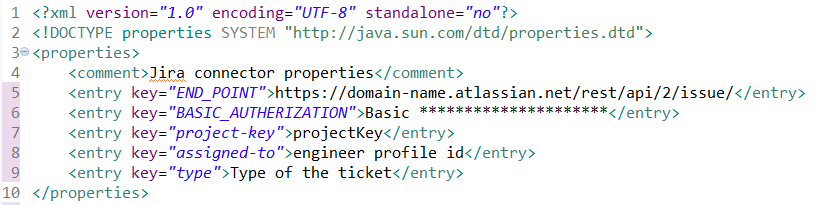
Create an XML configuration file by name 'jira.xml'. This file will contain JIRA endpoint, authentication, and other field details.
jira.xml should contain below properties:
| XML property Keys | XML property Value |
|---|---|
| end_point | The URIs for resources have the following structure: https://<site-url>/rest/api/2/issue/ Ex: https://your-domain.atlassian.net/rest/api/2/issue/ |
| basic_authorization | JIRA software credentials USERNAME and password should be in base64Encoded format |
| project-key | The project key in the JIRA software where you want to store the tickets. To check the project key go to the projects tab in the JIRA software. |
| assigned-to | Provide the engineer's JIRA profile Id to whom you want to assign it. |
| type | Type of the JIRA ticket. Generally, the type of ticket will be: Task, Bug, Story, Epic. |
Below is the sample jira.xml configuration file.
# 2. Place JIRA configuration file
PPlace the newly created jira.xml in the 'upload' directory.